
Social mentions & outreach
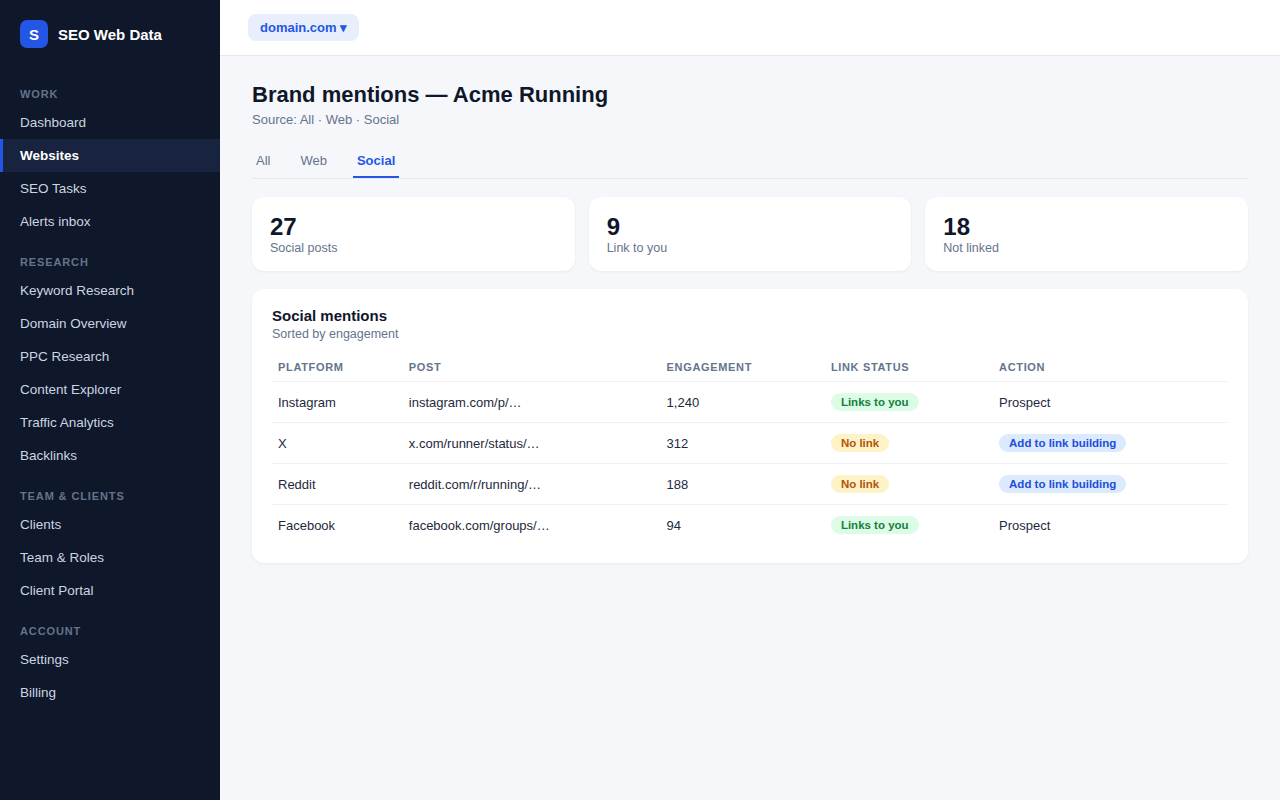
Brand mentions now include social posts as well as web pages. See which ones link to you, how much they were engaged with, and turn the ones worth a conversation into prospects in your outreach pipeline.
What's included
- Each mention labelled web or social, with a source filter
- Social engagement counts where the platform reports them
- Social posts become outreach prospects, with the post link and platform saved
Your brand mentions monitor already finds pages that mention your name. Each one is now labelled web or social, so you can switch between the two, sort social posts by engagement and export them with the rest of your data.
A social post is not a link you can place, but it is a route to a conversation with the person or account behind it. Adding one to link building creates a prospect marked as a social source with the post address and platform saved, so the ask can be personal.
On each page of your site, a Social signal panel counts the monitored social posts that link to that exact page in the last 30 days. The same count appears beside results in the content explorer.
How it works
Social posts come from the same lookup your brand monitor already makes, so this costs no extra allowance. The platform reads each page to check whether it links to you, and only counts a post as linking to a page when that link was actually found. Engagement figures are the ones reported for the post and are estimates, so treat them as a guide.
Why social mentions belong in link building
- Warm starting point — someone who has already talked about you is easier to approach than a cold contact.
- See what is being shared — pages that attract social links are often the ones worth building more like.
- One pipeline — social prospects sit beside gap and broken-link prospects, filterable by source.
What it does not do
The social signal is this platform’s own count of posts your monitors found. It is not a share total reported by the social networks, it is not a ranking factor, and sites you do not monitor show nothing. It never posts, follows or messages anyone on your behalf.
Works with the rest of the platform
Draft your own promotion with social post drafts, then track the response here. Prospects move through the outreach pipeline like any other.
Frequently asked questions
Does this cost extra?
No. Social posts come from the lookup your brand monitor already makes.
How does it know a social post links to my page?
The platform reads the post’s page and only counts a link it actually finds. A post that mentions you without a link is counted at site level only.
Is the engagement number exact?
No. It is the figure reported for the post, where the platform reports one. Use it to compare posts, not as an exact count.
Does it post or message anyone for me?
No. You reach out yourself, and the pipeline records what you did.