
AI Visibility Trends & Alerts
One reading tells you where you stand. A trend tells you where you are heading. Follow your AI visibility over time and get told when it drops.
What’s included
- A visibility trend chart for each engine
- Daily snapshots of your named and cited rates
- Drop alerts compared with about a week earlier
- Safeguards so thin data never triggers a false alarm
AI assistants change constantly. A model update, a new competitor page or a change on your own website can shift who gets recommended almost overnight. Trend tracking makes those shifts visible, so you can connect a change in visibility to the thing that caused it.
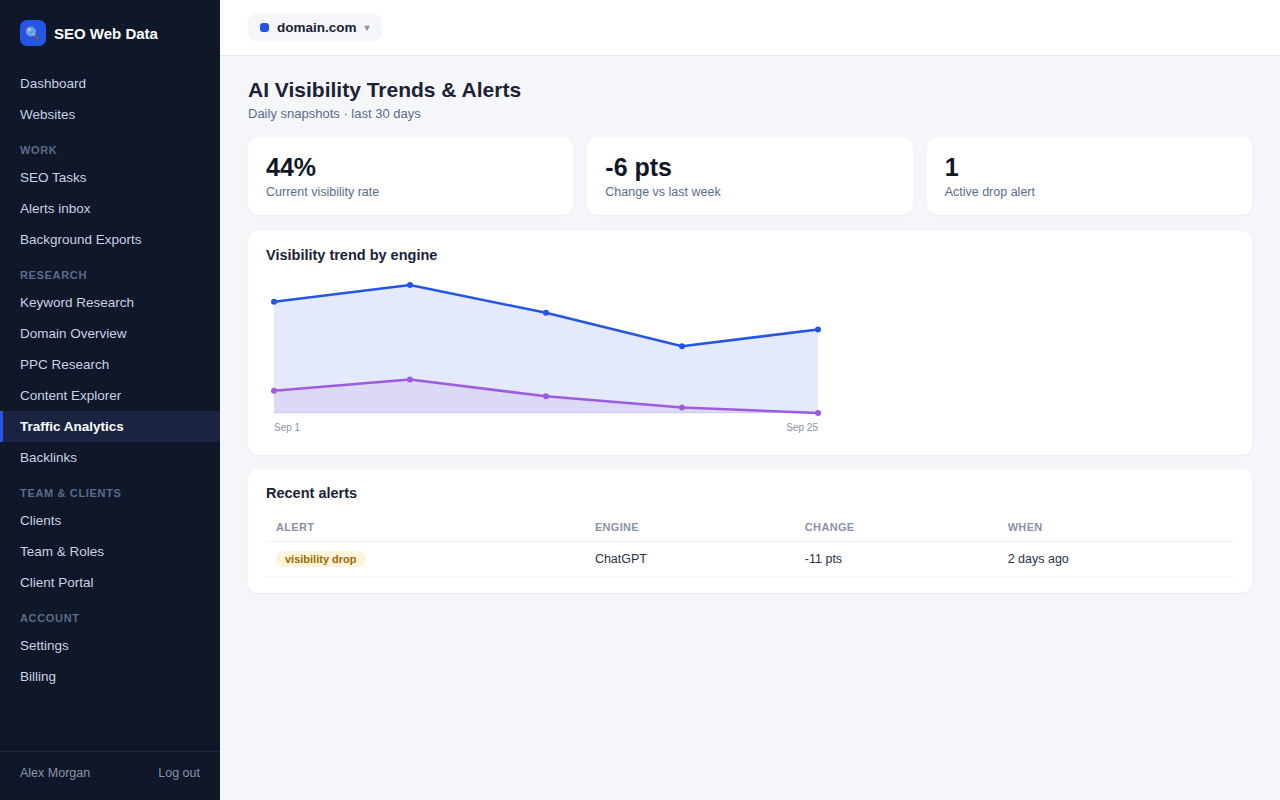
Each day’s results are rolled into a snapshot for every website and engine, and the snapshots are plotted as a chart of your visibility rate over time.
Reading the trend chart
The chart plots the percentage of runs in which you were named or cited, one line per engine. Look for direction rather than day-to-day wobble: a single low day can be nothing more than natural variation between answers, while a steady slide over two weeks deserves attention.
Because each point is built from runs in the recent window, more frequent checks and more runs per prompt make the line smoother. If your chart looks jumpy, that is a hint to run each prompt a few more times, as described in AI prompt tracking.
Drop alerts
You do not need to watch the chart to notice a problem. When your visibility rate falls by a significant number of points compared with about a week earlier, an alert is raised for that website and engine. It appears alongside your other alerts in the monitoring and alerts inbox, and can be sent out through webhooks like any other alert.
- Enough data first: an alert only fires when there are enough successful runs to trust the comparison.
- Once a week at most: repeated alerts for the same website and engine are combined, so you are not buried in notifications.
- Failures are ignored: runs that failed are left out entirely, so a provider hiccup can never look like a collapse in visibility.
Working out what changed
When an alert arrives, start with the answer history. Read a few recent answers for your key prompts and compare them with older ones: has a competitor moved up, has a new source appeared, or has the wording about you changed? The share of voice and competitor view will show whether a rival is gaining while you stand still.
Then check your own website. A recent redesign, a removed page or a change in your technical SEO can all affect whether engines find and trust your content. Because everything sits in one account, you can move from the alert to the crawl results in a couple of clicks.
Keeping a record
Snapshots are kept long after the individual answers have aged out, so you can show a client the story of several months rather than a single moment. Bring that history into your regular client reporting and the trend becomes part of the monthly conversation instead of a surprise.
Setting realistic expectations
AI visibility is a slower-moving measure than most people expect. Improvements you make to your content or reputation usually show up over weeks, not days, and the numbers will always carry some noise. Judge progress over a month or more, compare like with like across the same prompts and engines, and treat an alert as a prompt to investigate rather than proof that something is broken. That habit keeps you calm when a figure wobbles and quick to act when it genuinely slides. Note down the date of any big content release or site change so you can line it up with the chart later and learn which of your efforts actually move the needle.
Frequently asked questions
How big a drop triggers an alert?
An alert fires when your visibility rate falls by a meaningful number of points compared with about a week earlier, and only when enough successful runs exist to make that comparison reliable.
Will I get repeated alerts for the same drop?
No. Alerts for the same website and engine are combined so you receive at most one a week.
Can I send alerts to another system?
Yes. Like other alerts in the platform, they can be delivered through webhooks. See API and integrations.
How far back does the trend go?
Daily snapshots are kept for years, which is long enough to compare your visibility across seasons and campaigns.