
Release monitor & change correlation
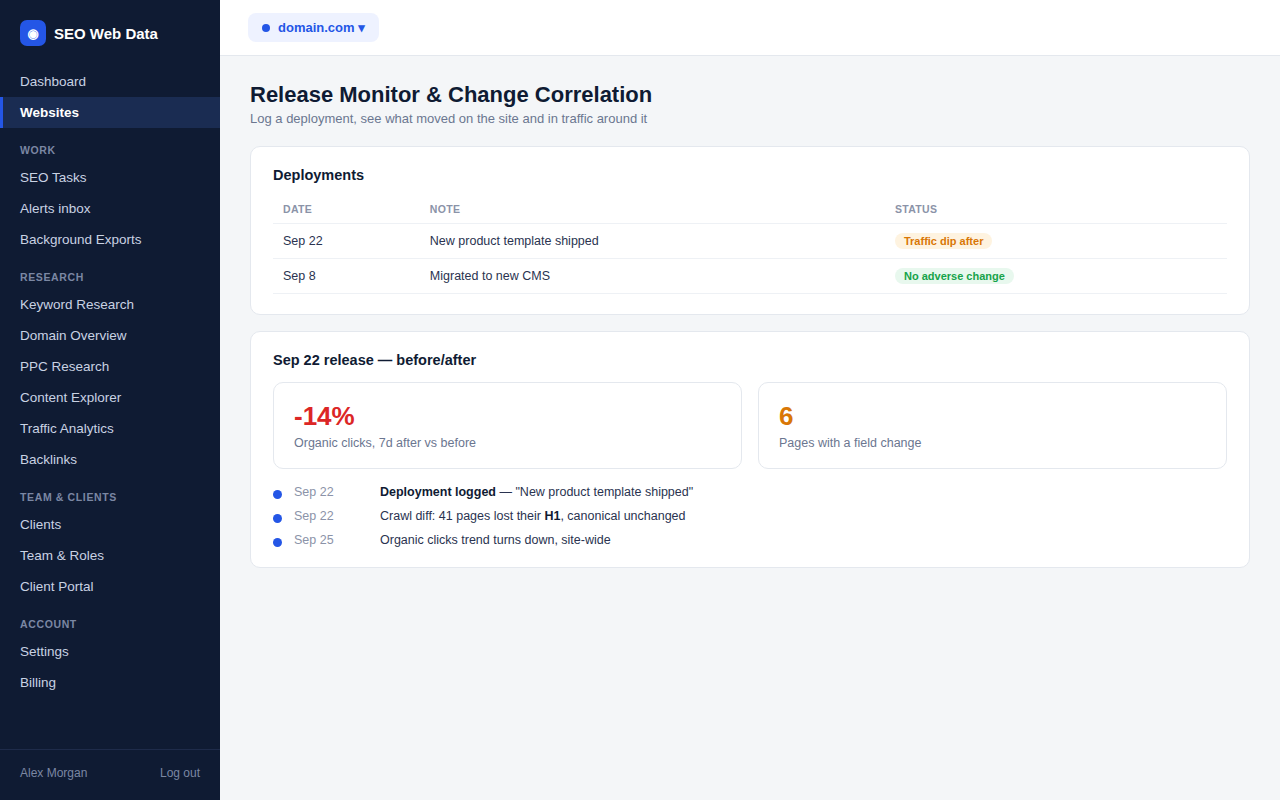
"We deployed changes — did anything move?" is one of the most common questions after a site update, and normally means digging through a crawl diff and a traffic chart separately, by hand. Release Monitor logs the deployment once and brings both views together automatically: what changed in your crawl around that date, and what happened to traffic around it.
What's included
- Log a deployment with a note and a date, from a form that can also trigger a crawl
- Automatic before/after crawl diff across the two nearest analysed crawls
- Traffic correlation for the same window, shown side by side — never stated as cause and effect
"We deployed changes — did anything move?" is one of the most common questions after a site update, and normally means digging through a crawl diff and a traffic chart separately, by hand. Release Monitor logs the deployment once and brings both views together automatically: what changed in your crawl around that date, and what happened to traffic around it.
How it works
Logging a deployment is quick — a short note and a date, optionally paired with a fresh crawl started right from the same form, using the same crawl budget and rate limits any other crawl on your account would follow. Once logged, it's shown on your existing SEO Health Timeline and change correlation pages automatically, with no extra setup.
Opening a deployment composes two things this app already does well: a field-level crawl comparison (title, H1, canonical, indexability, HTTP status, schema, internal links) between the two analysed crawls nearest the deployment date, and a before/after traffic comparison over the same window. Both engines already existed independently for other parts of the app — this is the orchestration that picks the right two crawls and lines the comparison up against one specific, named event, rather than you having to line them up yourself.
Why it matters
The single hardest question after any meaningful site change is whether it actually caused what happened next — and the honest answer is usually "we can't be certain, but here's what changed alongside it." This is built around that honesty deliberately: it never states that a deployment caused a traffic move, only that the two did or didn't happen close together, with the underlying crawl diff shown right there so you can judge for yourself. That's a much faster starting point than reconstructing the timeline from memory a week after something goes wrong.
Built on the same engines behind SEO change detection and the SEO Health Timeline.
Frequently asked questions
Does this replace the SEO Health Timeline?
No — a logged deployment is one more marker on that same timeline and on change correlation. Nothing about either existing view changes.
Can I start a crawl directly from the deployment form?
Yes, "Crawl now" goes through the same crawl-start process as any other manual crawl, so your plan's budget and rate limits still apply.
Does it tell me the deployment caused a traffic change?
No — it shows the crawl diff and the traffic move for the same window side by side and explicitly avoids claiming causation either way.
What happens if only one analysed crawl exists near the date?
It's handled as a known edge case rather than a silent error — you'll see that clearly rather than a misleading comparison.