
One-click WordPress fixes
Finding an issue is only half the job — fixing it usually means logging into WordPress, finding the right page, and editing the right field in the right plugin. One-click fixes close that gap: review a suggested fix inside SEO Web Data, click Apply, and a small WordPress plugin writes it straight into your site.
What's included
- One-click apply for titles, meta descriptions, canonical URLs and image alt text
- Writes to Yoast SEO, Rank Math or All in One SEO's own fields, so the change actually renders
- Bulk apply several reviewed fixes on one page, and one-click revert
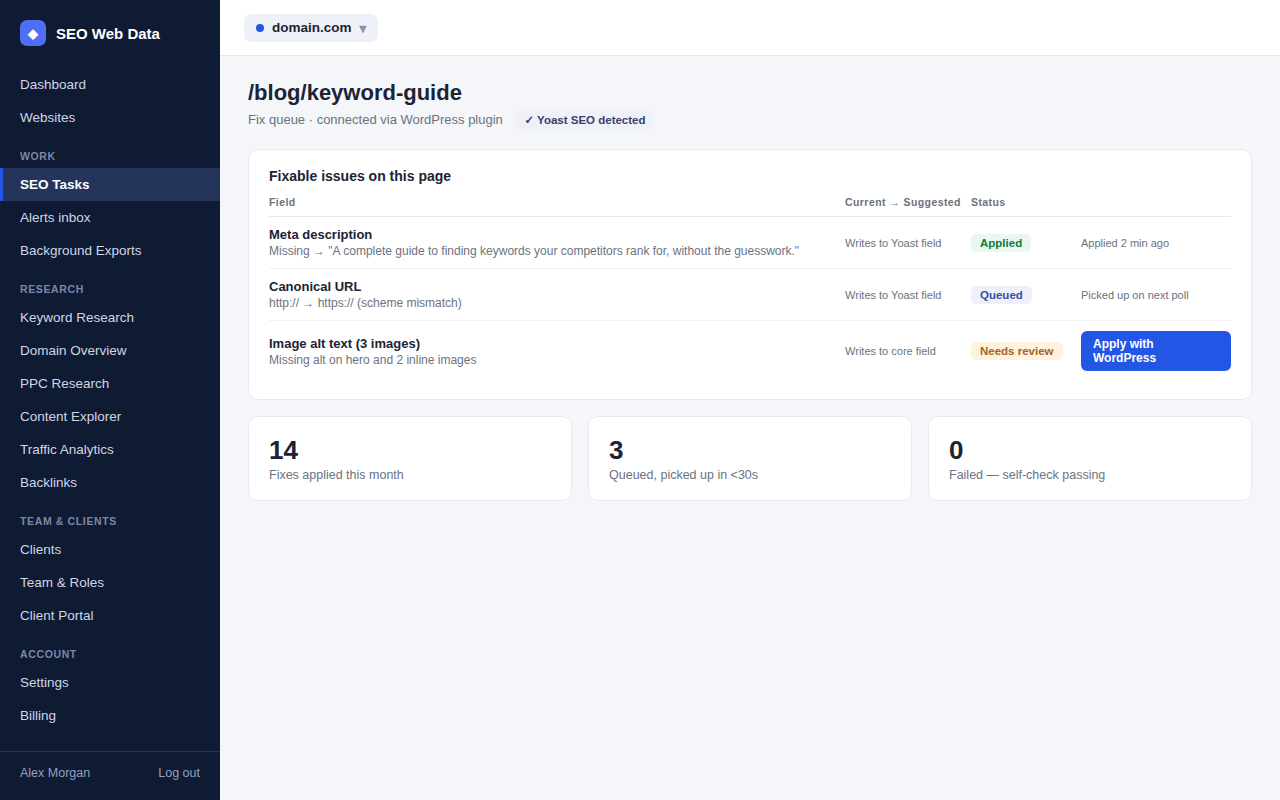
Every fixable issue found by the SEO score and fix list can carry an Apply with WordPress button once your site is connected. You see the current value and the suggested one side by side, choose to apply it, and the fix is queued for the plugin to pick up — nothing changes on your site until you make that choice.
How it works
Connecting a site takes one step: install the free SEO Web Data Fixes plugin from your WordPress admin, and enter the pairing code it shows you back on your website's settings page here. From then on, any fixable issue found during a crawl can be queued for that site.
Queuing a fix doesn't touch your site by itself. It's held as a reviewed, pending change until the plugin next checks in — which, thanks to a quiet wake signal sent the moment you queue something, is usually within seconds rather than on a fixed schedule. The plugin applies the change, reports back, and the fix moves from Queued to Applied in your dashboard.
Written where your SEO plugin expects it
A title or meta description fix is only useful if it's the one Google actually sees. If Yoast SEO, Rank Math or All in One SEO is active on your site, fixes are detected and written into that plugin's own fields, not a separate value it ignores. Sites without one of those plugins still get fixes applied to WordPress's core title and content fields. WooCommerce product and category pages use the same underlying fields as any other page, so fixes apply to a shop the same way they apply to a blog.
Bulk apply and revert
Where a single page has several reviewed, fixable issues — a missing meta description alongside a couple of images with no alt text, say — bulk apply queues all of them from one page in a single action, instead of clicking Apply once per issue. If a fix turns out to be wrong, Revert queues the previous value through the exact same review-and-apply path, rather than a separate, less-checked "undo" mechanism.
An optional, narrow auto-queue
Titles, meta descriptions and alt text always need a person to review them before they're queued — nothing about wording is ever guessed. There is one opt-in exception, off by default: sites can choose to auto-queue two canonical URL fixes that have only one correct value with no room for interpretation (a canonical pointing at the plain-HTTP version of a URL that's served over HTTPS, or a canonical pointing at a page that now redirects). Turn it on per site, or leave every fix — including these — as review-first.
Built to fail safely
The plugin checks that everything still looks as expected before every poll, and pauses applying fixes rather than pushing one through if that check doesn't pass. It also updates itself in place from your WordPress admin when a new version is released, the same way any well-behaved plugin does, so you're not left running an old version by accident.
Frequently asked questions
Does this write directly to my site without asking?
No. Every fix is reviewed and queued by you first. The plugin picks it up, applies it, and reports back — nothing is ever guessed or applied automatically, except the one narrow, opt-in exception for two fully-derivable canonical URL fixes.
Which SEO plugins does it work with?
Yoast SEO, Rank Math and All in One SEO. If one of these is active, fixes are written to that plugin's own fields so the change is the one actually rendered on the page. Without one installed, fixes use WordPress's own core fields.
Does it work with WooCommerce?
Yes — product titles, descriptions and images use the same WordPress fields as any other page, so fixes apply to WooCommerce products and category pages the same way.
Can I undo a fix once it's applied?
Yes. Revert queues the previous value through the same review-and-apply path, so undoing a change is never a separate, less-checked mechanism.
How quickly is a queued fix applied?
Usually within seconds. The plugin polls on a schedule, and queuing a fix sends it a quiet signal to check in early rather than waiting for its next scheduled poll.
What if something on my site looks wrong?
The plugin runs its own compatibility check before every poll and pauses applying fixes if that check fails, rather than guessing or forcing a change through.