
Follow-up reminders
Most links are won on the second or third message. Follow-up reminders set the date for you, alert you when it arrives and note when a link appears, so no prospect goes quiet by accident.
What’s included
- Follow-up date set seven days ahead when you contact a prospect
- Overdue follow-ups highlighted in red and counted
- A daily check that raises an alert for each due follow-up
- A “link seen” note when a prospect’s domain appears in your backlinks
Persistence is what separates successful outreach from wasted effort. A busy editor may miss your first message completely, so a polite reminder a week later often makes the difference. The trouble is remembering to send it.
Follow-up reminders take that job off your mind. They work from dates on each prospect and never change a status without you.
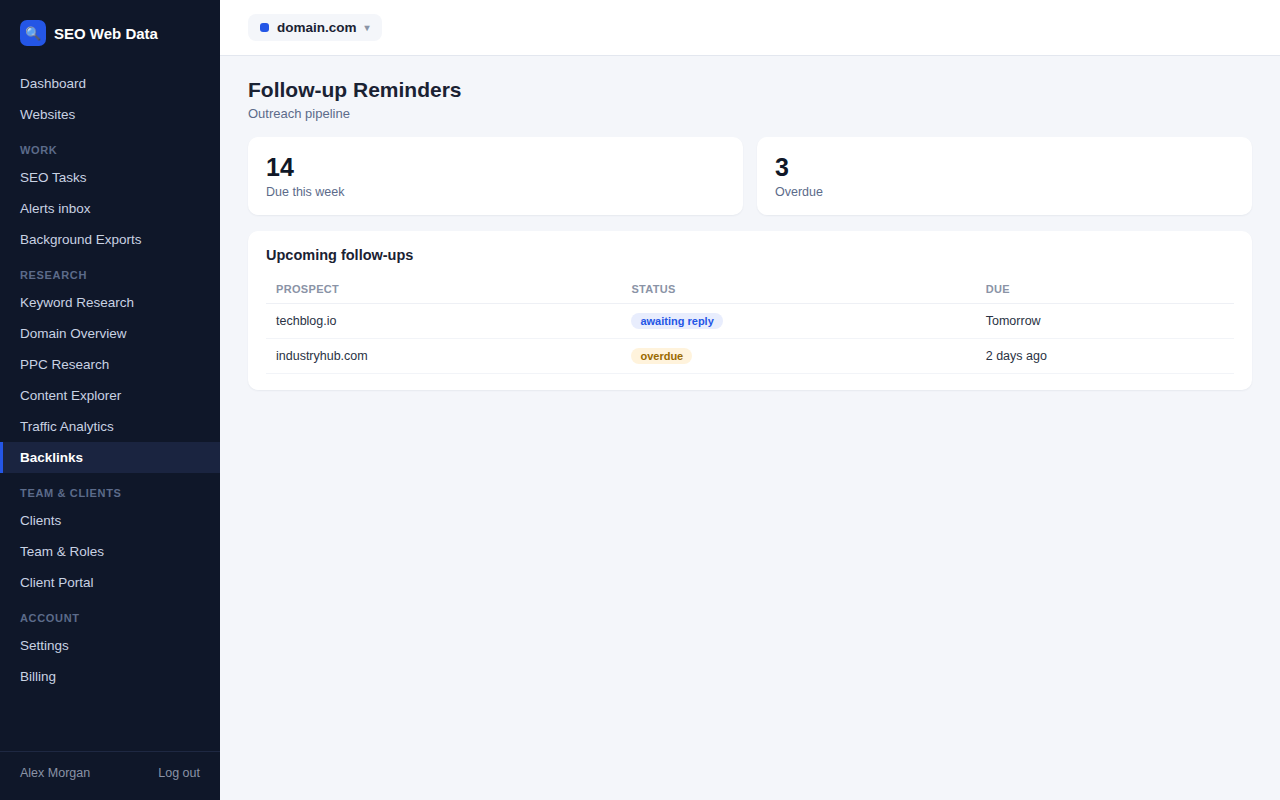
How follow-up dates behave
When you mark a prospect as contacted, a follow-up date is set seven days ahead. Choose “contacted” again and the platform records that a follow-up was sent and moves the date forward. Marking a prospect as replied, won, lost or not relevant clears the date, because there is nothing left to chase. You can also set any date yourself on the prospect page.
Seeing what is due
A counter at the top of the pipeline shows how many follow-ups are due. Overdue dates turn red in the table, and one filter reduces the list to only the prospects that need a message today. It is a ready-made daily to-do list for whoever owns the outreach.
Alerts when a follow-up is due
A daily check looks for follow-ups that have reached their date and raises one alert per prospect per date in your alerts inbox. To keep the inbox usable, a website gets at most ten of these per run, and dates more than 60 days old are ignored rather than dredged up again. The check works only from what is already stored and contacts nobody.
Noticing when a link appears
When a prospect is marked contacted or replied, the daily check compares its domain with the latest stored backlink sample for your site. If it appears, a “link seen” note is added to the timeline and a badge shows on the prospect.
That is a hint, not proof. The backlink sample is capped, and the domain may be linking to a different page from the one you asked about, so open the page and check the link yourself. The status is never changed automatically, and the note is added once rather than every day.
A simple daily routine
Start each morning on the pipeline with the due filter switched on. Send the follow-ups first and mark each as follow-up sent, and the dates move forward on their own. Then check the alerts inbox for anything that arrived overnight, and open any prospect with a “link seen” badge to confirm the link is live. Fifteen minutes a day is usually enough to keep even a large campaign moving, and because the dates live on the prospect rather than in someone’s calendar, work carries on smoothly when a colleague is away.
Writing a better follow-up
Keep it shorter than the first message, refer back to it and add one new reason to say yes, such as a fresh statistic or an updated page. Two or three attempts is plenty. After that, mark the prospect as lost, thank them if they replied, and spend the time on a site that is more likely to respond.
Why nothing changes on its own
Outreach is a conversation, and only you know how it went. Reminders prompt you to act and evidence appears on the timeline, but moving a prospect to “link won” always stays your decision. Once it does, record the live address alongside it, so your report of links won is accurate.
Frequently asked questions
How long until a follow-up is due?
Seven days after you mark a prospect as contacted. You can change the date on any prospect.
Will I be flooded with alerts?
No. There is one alert per prospect per due date, a maximum of ten per website per run, and dates more than 60 days old are ignored.
Does “link seen” mean I have won the link?
Not necessarily. It means the domain appears in the stored backlink sample for your site. Check the link yourself, then update the status.
Do reminders send messages to prospects?
No. Reminders only alert you. Nothing is sent to anyone outside your account.