
Citation & listing management
See where your business is already listed across the directories that matter for local rankings, and whether each listing's name, address and phone still match your reference profile — so a mismatch gets caught before a customer notices it first.
What's included
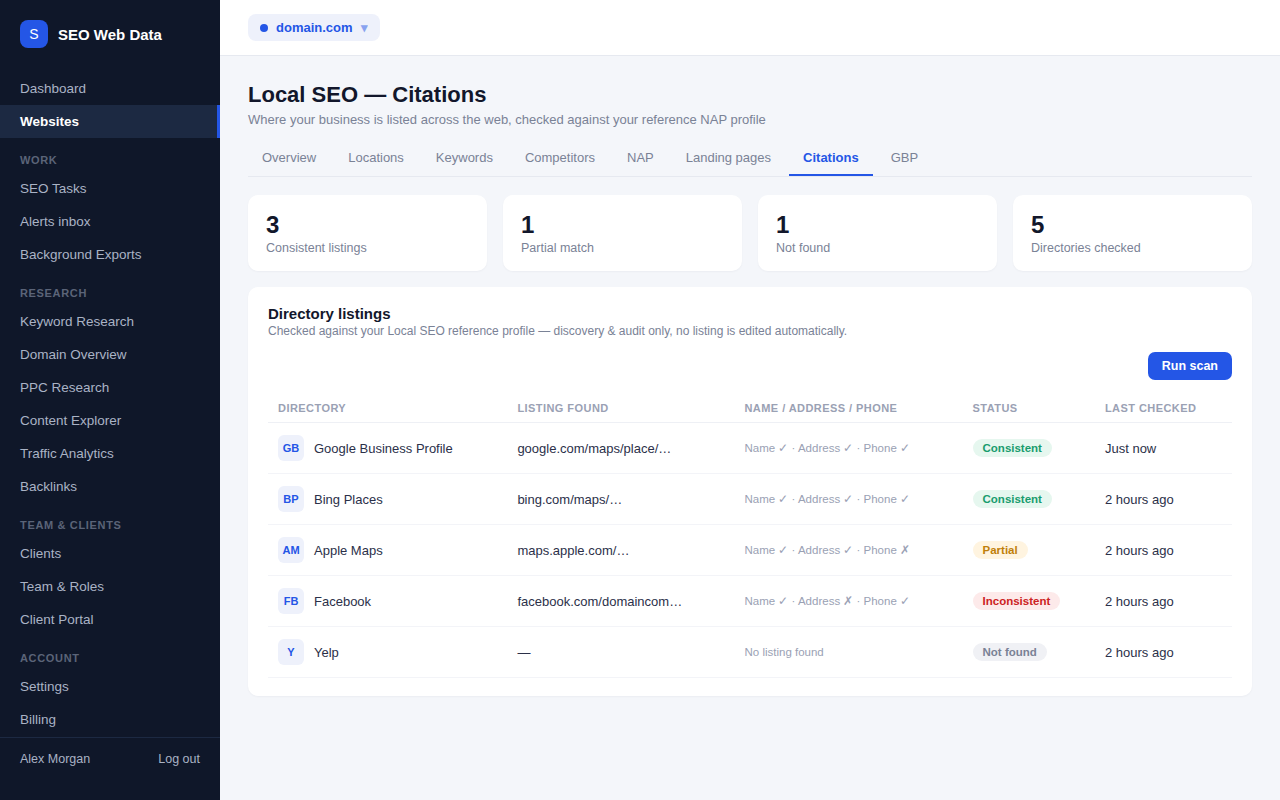
- Checks across five major directories
- Name / address / phone match status per listing
- Consistent, partial, inconsistent or not-found status
A single scan checks Google Business Profile, Bing Places, Apple Maps, Facebook and Yelp against your Local SEO reference profile, using the same abbreviation-tolerant NAP matching your existing NAP page already relies on — so "consistent" means the same thing everywhere in the app.
Google Business Profile is compared instantly from your already-linked, already-synced data at zero extra cost; the other four directories are checked with a bounded, rate-limited lookup each time you run a scan.
How it works
Run a scan from the new Citations tab alongside your existing NAP, Locations and GBP tabs, and each configured directory is checked in turn. A found listing is compared field-by-field against your reference name, address and phone, and rolled up into an overall status: consistent, partial (some fields match), inconsistent, or not found. A directory that can't be read right now — a layout change, a block, a timeout — is marked "couldn't check", never guessed at as "not found," because an inconclusive result and a genuine absence are two very different things.
Results are kept between scans, so the tab always shows the latest status alongside when it was last checked, and can flag you by alert when a previously-consistent listing starts to drift or a previously-found listing disappears.
Why discovery and audit, not automatic fixing
Actually writing corrected details into Google Business Profile, Bing Places, Apple Maps, Facebook or Yelp needs either a direct API partnership with each platform or a commercial data-aggregator relationship — real infrastructure this feature deliberately doesn't fake. What it gives you instead is the clear, current picture of where you're listed and what's wrong, so fixing a listing is a five-minute job you can prioritise rather than a mystery you have to go looking for.
- Catch drift early — an old phone number or address surviving on a directory you forgot about is a common, avoidable source of lost local customers.
- One reference profile — reuses the same Local SEO reference data your NAP checker and Google Business Profile linking already use, so there's nothing new to set up.
- Honest about coverage — eight directories and profiles today, clearly labelled as a starting list rather than a claim of full parity with a dedicated citation-management tool.
- Exportable — download the full listing status alongside your other Local SEO data exports.
Social profile checks too
Alongside Google Business Profile, Bing Places, Apple Maps, Facebook and Yelp, the scan now also looks for your business on Instagram, LinkedIn (Company Page) and X. Those three sit behind sign-in walls more often, so a page that cannot be read is reported as check failed rather than not found, and you should open the profile yourself to be sure. Everything is still read-only: nothing is created, edited or submitted for you.
Frequently asked questions
Which directories are checked?
Google Business Profile, Bing Places, Apple Maps, Facebook and Yelp at launch — a small, growing list rather than a claim to cover dozens of directories on day one.
Does this fix or update my listings for me?
No — this checks and reports discrepancies. Fixing a listing today means logging into that directory yourself, or updating it directly here if it's your linked Google Business Profile.
What counts as a NAP mismatch?
Each listing's name, address and phone are compared against your Local SEO reference profile using abbreviation-tolerant address matching and phone-format normalisation, so "St." vs "Street" or "+44" vs "0" aren't flagged as false mismatches.
What if a directory can't be checked right now?
A directory that can't be read — a layout change or a blocked request — is shown as "couldn't check", never guessed at as "not found". Google Business Profile is checked from your already-linked, already-synced data, so it's the most reliable row.
Which directories and profiles are checked?
Google Business Profile, Bing Places, Apple Maps, Facebook, Yelp, Instagram, LinkedIn (Company Page) and X. Sign-in walls on the social profiles can make some checks come back as check failed.