
Bulk actions
Run the same action across up to 50 websites at once — start a crawl, add tracked keywords, create a task, change crawl frequency, assign a client, or toggle portal visibility — instead of clicking through each website in turn.
What's included
- Six bulk action types across up to 50 sites
- Per-site results for every run
- A full audit trail of what was run and by whom
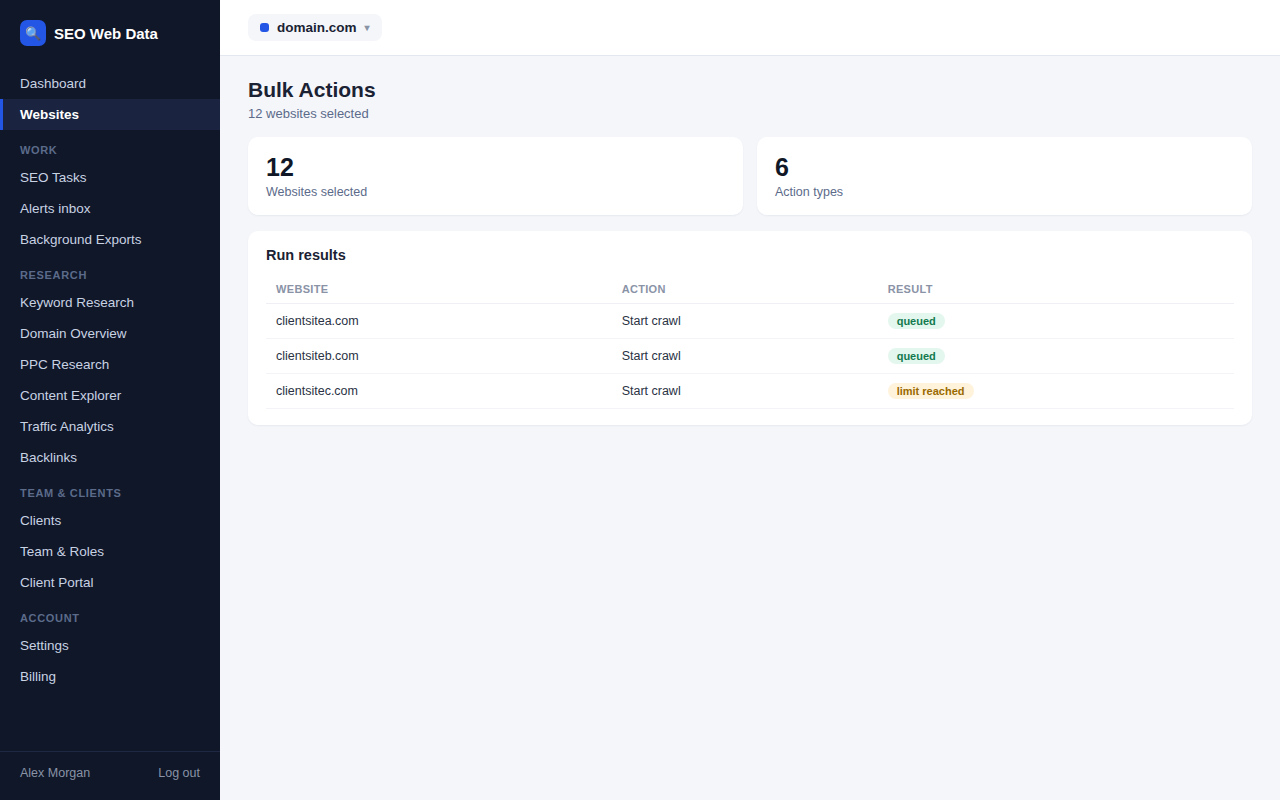
Pick the websites, choose the action, and see a per-site result once it's done — a website that fails for some reason (no crawl allowance left, for example) is reported individually rather than silently skipped or failing the whole batch.
Every bulk run is logged, so it's always possible to see who ran what, across which websites, and when — useful when several team members manage the same book of client sites.
How it works
From the Bulk Actions page, select any combination of your websites, pick one of the six supported actions, and confirm. Each site is processed independently and the results page shows exactly what happened to each one.
Why bulk actions matter at agency scale
- Minutes, not hours — a crawl-frequency change or a new keyword across 40 client sites is one action, not 40.
- Nothing silently skipped — a per-site result means a failure on one website is visible, not lost in a batch summary.
- Accountable — the audit trail means a bulk change is always traceable back to who ran it.
Frequently asked questions
How many websites can one bulk run cover?
Up to 50 websites in a single run.
What happens if an action fails for one website?
That website's result shows the specific reason it failed; every other website in the run is unaffected and completes normally.
Which actions are supported?
Start a crawl, add tracked keywords, create a task, change crawl frequency, assign a client, and toggle portal visibility.